

Understanding User-Installed App Raids
A user-installed app raid can look impossible at first: an app your staff never approved is posting in the server. It’s not in the member list, a way to ban it is not immediately obvious, and even if you manage to ban it, it can still post. The missing piece is that the app belongs to a member’s account, not to the server.
What a user-installed app is
Section titled “What a user-installed app is”Discord apps can be added in two different places:
- A server-installed app is added to a server by somebody with permission to manage it. It appears in the server and can be given server permissions. This is the traditional way.
- A user-installed app is added to an individual’s Discord account. That person can take supported commands into servers, DMs, and group chats.
Discord describes this account-wide availability in its guide to using apps. When Discord expanded the App Launcher in 2024, it likewise explained that supported apps could be added to an account and used across servers and DMs.
Discord Help CenterUsing Apps on DiscordDiscord's guide to adding apps to a server or to your own account, launching them, and managing authorized apps.This is useful for legitimate tools: translation, image editing, games, lookups, and personal workflows no longer need a server administrator to install every app. It also changes what server staff must moderate. A member can cause an external app to post a public response even though the app was never added to the server.
What a user-installed app raid is
Section titled “What a user-installed app raid is”User-installed app raid is the term this documentation uses for disruptive, repeated public app output caused through apps installed to members’ accounts. It’s our product-specific description, not a separate raid category officially named by Discord.
It can take several forms:
- one member repeatedly invokes one app;
- one member rotates through several apps;
- several members coordinate around the same app; or
- an app response contains buttons or other controls that produce more unwanted output.
Discord’s general raid guidance defines a traditional raid as many users or bots joining together with disruptive or malicious intent. A user-installed app raid may be coordinated in the same way, but it does not require a wave of new joins. It can be carried out by one existing member, several existing members, or compromised accounts.
Discord Help CenterHow to Protect Your Server from Raids 101Discord's explanation of raids, prevention settings, and steps moderators can take while a raid is active.Discord describes spam more broadly as en-masse account creation or use that presents people with unwanted or malicious content (How We’re Fighting Spammers on Discord). That is why Archivian calls this feature both anti-spam and anti-raid: the visible behavior is often a message flood, while the intent and coordination may be a raid.
Easily see who’s responsible
Section titled “Easily see who’s responsible”Some raid bots will attempt to hide who’s really responsible by deleting the original message that started the chain of the flood.
What you can do instead is to right-click the message, then open the “View Interaction Info” panel in the dialog. What you are looking for is who triggered the app. Who installed the app may also be responsible. Usually it is the same person.
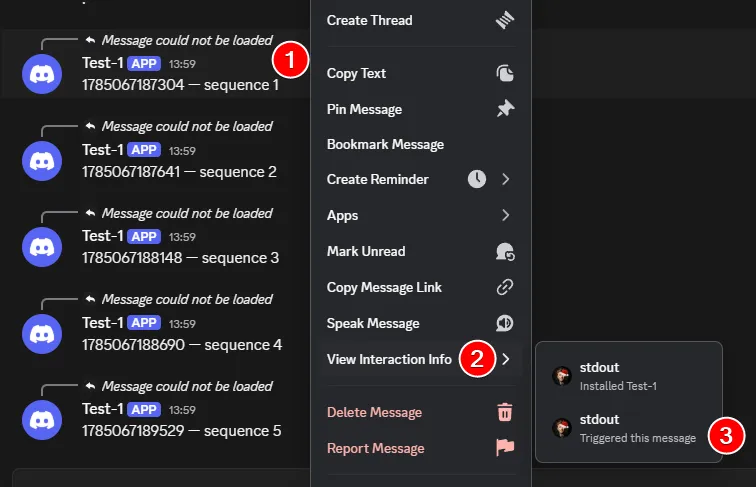
Everyone has access to see this info panel, not just people with higher role permissions. If you do not see the View Interaction Info panel when you right-click a message, it means that it either is a webhook message or it is a server-installed bot.
- For server-installed bots, you can ban them normally.
- For webhooks, you can manage webhooks from the channel settings: Integrations -> Webhooks.
Examples reported by server moderators
Section titled “Examples reported by server moderators”Most of these raids are reported by server moderators that experienced it, and who all had the same problem: they couldn’t counter it right away, and banning the app didn’t help, and who initiated it isn’t visible.
The app used is also not visible as a member of the server, and nobody from the staff team added it. Here are some examples of reported incidents where users are confused as to how this was possible and how to counter it.
How the unwanted output reaches your server
Section titled “How the unwanted output reaches your server”The usual sequence is:
- A Discord user authorizes an app on their own account.
- The user invokes one of that app’s commands or controls in your server.
- Discord delivers the interaction to the app.
- The app responds in the server channel under the app’s identity.
- Usually slash-commands are used, which produces a message from the user, but the app usually auto-deletes it fast to hide who invoked it.
- Even so, you can still see who did it by using the View Interaction Info on the messages.
- A follow-up feature of interactions produces several messages per interaction invocation.
- Repeated interactions create the flood.
Slash commands, buttons, select menus, and modals are all app interactions that can produce app responses.
Discord Developer DocumentationInteractions OverviewDiscord's platform documentation for commands, buttons, select menus, and other app interactions.The app has not secretly joined the server. Discord says external apps do not appear under Server Settings → Integrations and, because they were not installed to the server, cannot act there beyond responding to interactions with messages, attachments, and embeds.
Discord Help CenterModerating Apps on DiscordDiscord's guide to external apps, app permissions, command controls, and how AutoMod treats app output.Why normal anti-raid controls can miss it
Section titled “Why normal anti-raid controls can miss it”There may be no join spike
Section titled “There may be no join spike”Join-rate protection, verification gates, paused invites, and new-account screening are useful against a traditional incoming raid. They may see nothing unusual when existing members—or accounts that joined earlier—create the app flood.
The visible author is not the responsible member
Section titled “The visible author is not the responsible member”The message looks as if it came from the app, but a member’s interaction caused it. Moderation has to connect both identities:
- Who invoked it? This is the member whose behavior may need a warning, timeout, kick, or ban.
- Which app produced it? This reveals coordinated use of the same tool across several members.
Discord’s own AutoMod follows a similar attribution rule for external-app messages: its actions apply to the user who installed and first invoked the app, including later app output caused through buttons (Moderating Apps on Discord).
Why you cannot find or ban the app
Section titled “Why you cannot find or ban the app”A user-installed app does not become a server member. It therefore may not appear in the member list or the server’s integration list, and kicking or banning the app as though it joined the server is not the right control.
The practical controls are instead:
- act on the member who invoked it;
- prevent external apps from posting publicly;
- use AutoMod for unwanted content from external apps;
- detect and contain repeated use with Archivian; and
- report an app that violates Discord’s policies.
Why the Use External Apps permission matters
Section titled “Why the Use External Apps permission matters”Discord provides a Use External Apps permission for the whole server, roles, members, and channels. Turning it off prevents a user-installed app that is not installed to the server from posting a public response.
It does not completely disable the app. Discord makes the response private (ephemeral) to the member instead. This preserves personal tools such as translation without exposing the output to the rest of the server. Apps installed directly to the server are a different category and are not blocked by this permission.
Discord documents the setting under Server Settings → Roles → Apps Permissions in the
Moderating Apps guide linked above.
Channel and role overrides still matter: if another role grants the permission, changing only
@everyone may not cover that member.
How Archivian changes the response
Section titled “How Archivian changes the response”Discord’s permission is a strong preventive switch: public external-app output is either allowed or not allowed for a member in a channel. Archivian adds a graduated response for servers that want to keep legitimate user-installed apps available.
For every public response it observes, Archivian evaluates two independent subjects:
- the member, across all user-installed apps they use; and
- the app, across all members who use it.
This answers two different questions:
Is this member using apps unusually hard?
and
Is this app being used unusually hard across the server?
Fast activity builds up; quiet time makes the count fade. Low, Medium, and High thresholds turn that activity into a reviewable incident. Newer accounts and apps may count more, while trusted members and Discord-verified apps may receive a discount.
The app side is intentionally cautious with bystanders. When an app reaches a level, member-facing measures are armed for people who use it afterward. Archivian does not retroactively punish every person who used the app before it looked suspicious. Staff can make the stronger Mark hostile decision only from a High app alert.
For the exact controls, see:
- How the counting works
- User treatment and App treatment
- Settings available at each level
- Staff alerts and incident controls
What to expect when Archivian reacts
Section titled “What to expect when Archivian reacts”Depending on your configuration:
- A staff alert appears when a member or app first reaches a level.
- A continuing burst may move the same incident to a higher level and update the existing alert.
- Archivian applies only the actions configured for the level that was reached.
- App-level member actions affect later invokers, not earlier users.
- Staff review the evidence and choose to Clear, Escalate, Punish, Exempt, or—at High app level—Mark hostile.
- A standing summary later reminds staff about open incidents and apps that remain hazardous.
Some consequences cannot be undone. Deleted messages stay deleted; timeouts run for their chosen duration; kicks and bans require their own moderation decision. The settings reference lists the complete Clear behavior.
Responding during an active incident
Section titled “Responding during an active incident”Stop the public output first
Section titled “Stop the public output first”If unwanted app messages are still arriving, containment is more important than perfect classification.
- Disable Use External Apps for the affected channel, member roles, or
@everyone. - Check whether another role or channel override grants it back.
- Slow or lock affected channels if ordinary member spam is happening alongside the app output.
Discord’s raid response guide linked earlier also recommends Slowmode and channel lockdown as practical ways to regain control during a flood.
Archivian also has a Channel Lockdown feature that makes the channel lockdown easy, and its Channel-Spam AutoMod can automatically enable channel Slowmode.
Turning off Use External Apps makes future external-app responses private; it does not remove messages that are already public. Use Archivian’s tracked-message deletion, vote-delete, or your normal moderation tools for cleanup.
Review the member and the app separately
Section titled “Review the member and the app separately”Use Archivian’s two incident types to avoid the two common mistakes:
- Punishing only the app: it is not a server member, and another app can replace it.
- Punishing every user of an app: a legitimate app may have bystanders who used it before the raid became obvious.
For a member incident, review the invoker’s activity and decide whether to clear, exempt, or issue a case. For an app incident, decide whether it was a legitimate app being abused, a temporary hazard worth making radioactive, or a purpose-built griefing tool that warrants Mark hostile.
Preserve evidence and report malicious apps
Section titled “Preserve evidence and report malicious apps”Keep the incident alert, message links, app identity, responsible member identity, and timestamps. If the app itself violates Discord’s policies, report it through its profile, Authorized Apps, or the App Launcher.
Discord SafetyReporting Applications to DiscordDiscord's instructions for reporting an app from its profile, Authorized Apps, or the App Launcher.Do not treat an Archivian alert as proof by itself. A threshold says that behavior was unusual for your configuration; staff still decide intent.
Choosing between monitoring and blocking
Section titled “Choosing between monitoring and blocking”| Your server’s needs | Sensible approach |
|---|---|
| Members never need personal apps publicly | Disable Use External Apps for ordinary members. |
| Personal apps are useful in a few places | Allow them only in dedicated channels or for selected roles, and monitor those areas. |
| Personal apps are broadly useful | Keep them available, use Archivian’s graduated levels, and prepare a temporary server-wide clamp for High incidents. |
| You do not know normal usage yet | Run Archivian in Observation only, alert without punishing, then tune from real traffic. |
Discord also states that AutoMod can scan external-app messages, while messages from apps installed to the server are not flagged in the same way. Use content filters and behavior-based detection together: a flood of otherwise harmless-looking messages may evade a keyword rule, while one malicious image may need content moderation before any rate threshold is crossed.
Discord Help CenterAutoMod FAQDiscord's explanation of what AutoMod can scan, including messages from external apps.What this protection does not cover
Section titled “What this protection does not cover”User-App Spam is not a replacement for:
- join-rate anti-raid controls;
- Discord verification levels or Archivian verification gating;
- ordinary member message anti-spam;
- webhook or compromised server-installed bot incidents;
- AutoMod content rules;
- staff account security; or
- limiting permissions for server-installed apps.
Those systems answer different questions. User-App Spam is specifically for public responses that Discord identifies as coming from an app authorized to a user’s account.
Did somebody add a bot without Manage Server?
Not necessarily. A user-installed app is attached to a member’s account. If Use External Apps allows public replies, that member can use a supported app without adding it as a server integration.
Does disabling Use External Apps stop members from running those apps?
For spamming? Yes. Technically speaking? No. Disabling use of external apps via the permission forces the bot’s output to only be visible for the user that used the command (“ephemeral”). If the bot outputs are invisible to others, that effectively means it stops the spam.
Is every burst of app use a raid?
No. Games, image tools, event activities, and accessibility tools can produce legitimate bursts. That is why Archivian provides Observation only, trust discounts, exceptions, separate levels, and staff review rather than treating every threshold as proof of malicious intent.
Why not automatically ban everyone who uses a flagged app?
Because attackers could deliberately mass-use a legitimate app and cause innocent members to be punished. Archivian’s app actions only affect later users, and automatic app treatment does not offer mass kick or ban. Mark hostile requires a staff decision on a High app incident. Only that can cause automatic banning/kicking. Everything else focuses on tracking, informing, and containment.
Sources and further reading
Section titled “Sources and further reading”- Using Apps on Discord — Discord’s distinction between apps added to servers and apps added to user accounts.
- Moderating Apps on Discord — external apps, relevant permissions, command controls, and AutoMod behavior.
- Discover More Ways to Play with Apps—Now Anywhere on Discord — Discord’s announcement of account-installed apps being usable across conversations.
- How to Protect Your Server from Raids 101 — Discord’s raid definition and general containment advice.
- How We’re Fighting Spammers on Discord — Discord’s definition of spam and platform-wide countermeasures.
- Reporting Applications to Discord — current ways to report an app’s profile or behavior.
Public incident reports
Section titled “Public incident reports”These community reports are first-hand accounts, not independently verified reporting or prevalence data:
- Mass mentions and invite spam from an app the server owner could not ban — r/discordapp.
- Mass spam caused through a user app’s slash command — Discord Community feedback.
- Harmful-media raid attributed to Use External Apps — r/DiscordModeration.
- Coordinated app-like floods reported across related servers — r/discordhelp.