

User Context Menus
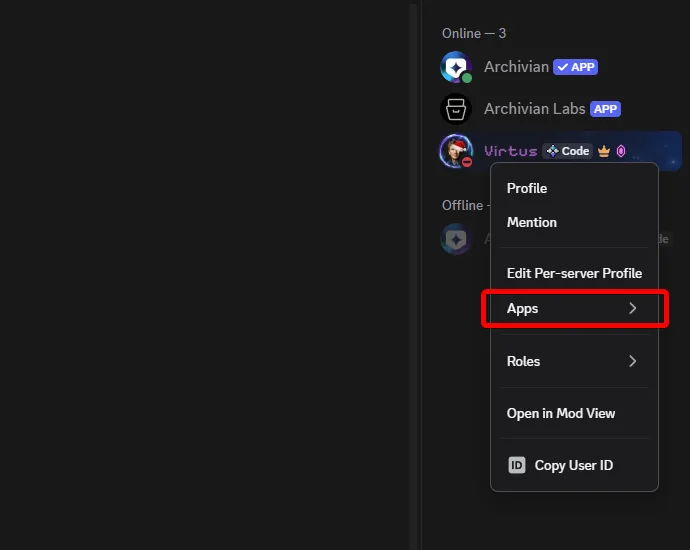
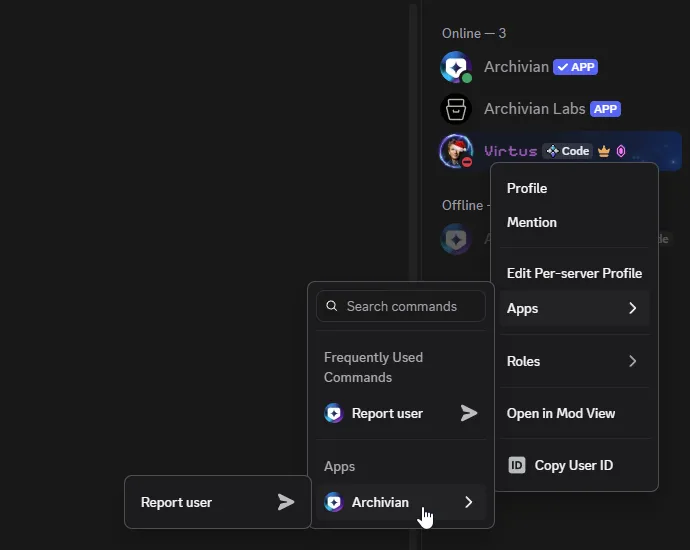
A user context menu action is something you run by right-clicking a user rather than by typing a command. It is the same Discord menu you already use to mention someone or change their nickname, with an Apps submenu where installed apps put their actions.
It works exactly like the message context menu, except the thing handed to the bot is the member you clicked rather than a message.
Where you can right-click a person
Section titled “Where you can right-click a person”More places than most people realize:
- Their name or avatar on any message they sent.
- Their entry in the member list on the right.
- Their name in the voice channel list.
- Their profile popout, once it is open.
All four open the same menu with the same actions.
-
On desktop: right-click the person. On mobile: tap their avatar to open their profile, then look for the ⋯ menu.
-
Find Apps in the menu, near the bottom.
-
Hover it (desktop) or tap it (mobile) to open the submenu.
-
Click the action you want.
What happens next
Section titled “What happens next”As with messages, it depends on the action:
- Some act immediately and reply to you privately.
- Some open a form to fill in, e.g. a reason, before anything happens.
- Some reply with buttons or a dropdown to provide more input.
The reply is normally ephemeral; only you see it. The member you clicked is not told that you used an action on them, unless the action is specifically meant to notify them.
What Archivian puts here
Section titled “What Archivian puts here”What you see depends on your server’s setup and your own permissions. Broadly, Archivian’s user actions cover reporting a member to your moderators and issuing a strike against them.
Each one has its own page under Commands with details.
When the action isn’t there
Section titled “When the action isn’t there”- No Apps entry at all. Nothing installed has registered a user action you are allowed to use
here, or your server has restricted them.
- Check Server Settings → Integrations → Archivian.
- Apps is there but the action is missing. You do not have permission for that particular action.
- It disappeared. Discord allows each app a maximum of five user actions, separate from its five message actions. Enabling a new one may have displaced another.
- You right-clicked a bot. Some actions only make sense on a person and are not offered on bots or apps.
- On mobile there is no right-click. Tap the avatar to open the profile, then use the ⋯ menu. Some clients put Apps behind a scroll.
An action that runs and then says you are not allowed is Archivian refusing rather than Discord. Your server’s staff control that in the Archivian dashboard.