

Verification Gating
What is this?
Section titled “What is this?”A system designed to decide whether new users joining your server should be blocked, required to prove themselves somehow, or let through without any hassle.
Discord Verification Level vs. Archivian Verification Gating
Section titled “Discord Verification Level vs. Archivian Verification Gating”Discord has a built-in Verification Level setting, where users must meet a configurable threshold:
- None — no restrictions.
- Low — must have a verified email on their Discord account.
- Medium — must also have been registered on Discord for longer than 5 minutes.
- High — must also have been a member of this server for longer than 10 minutes.
- Highest — must have a verified phone on their Discord account.
If one of those are enough for you, use Discord’s native Verification Level rather than Archivian for join-gating. But it often isn’t enough — the ideal is usually somewhere between Medium and High — and that’s when you’d layer Archivian’s join-gating on top. It’s recommended to use both at once.
Recommendations
Section titled “Recommendations”Large servers (10k+ members)
Section titled “Large servers (10k+ members)”Use Discord’s High threshold plus Archivian’s join-gating. During the 10 minutes users are forced to be a member but can’t interact, Archivian has time to run its own checks and make decisions before they can do anything.
Smaller servers
Section titled “Smaller servers”Use Discord’s Medium threshold plus Archivian’s join-gating. It’s reasonable to expect a user to have existed for at least 5 minutes. You’re less protected than with the 10-minute window, but it’s usually an okay compromise to let people join the conversation in small servers.
How it works
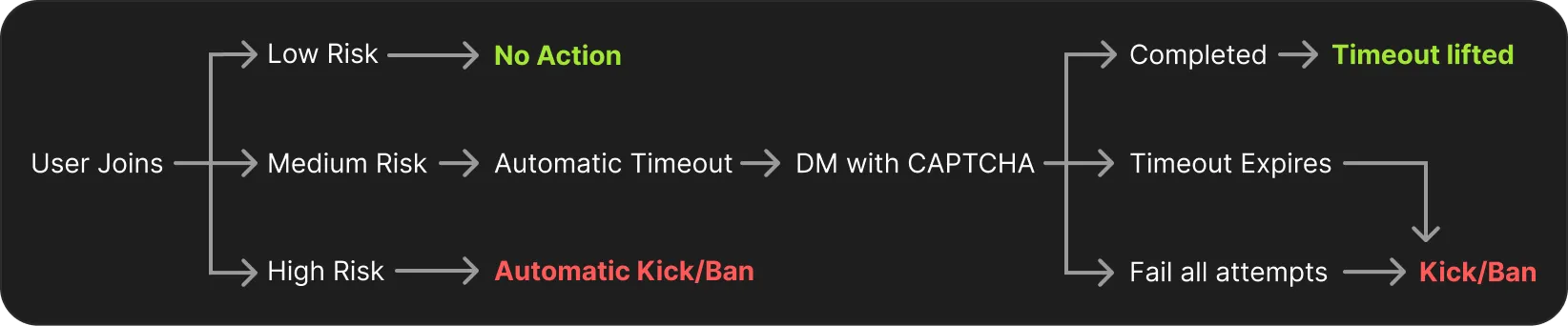
Section titled “How it works”When a new member joins, Archivian checks their account age or Trust Score. Based on this, high-risk users can be configured to be banned or kicked immediately. If a user matches the medium-risk threshold, they’re required to complete a CAPTCHA served by Archivian: they’re timed out immediately on join (the primary way they’re kept from interacting) until verification is completed. The timeout is lifted automatically once they pass. If they fail to complete it, or the time runs out, they’re kicked.
Adding roles to verified members
Section titled “Adding roles to verified members”Many servers keep their channels behind a “verified” role rather than relying on the default permissions. Archivian can hand that role out for you, from two places in the Join Gating settings:
- Medium Risk → Roles on Completion — added the moment the member passes their CAPTCHA, at the same time their timeout is lifted.
- Low Risk → Roles on Join — added immediately on join, because a low-risk member has no challenge to pass.
Pick the same role in both places if you want a single role that everyone who gets into the server ends up with. High-risk members are removed rather than verified, so they never receive anything.
Archivian needs the Manage Roles permission, and its own highest role must sit above every role you list. Roles a member already has are left alone. If a role cannot be added, the member still passes verification and staff get an alert in the server’s alert channel so it can be fixed by hand.
Backup delivery / DMs disabled
Section titled “Backup delivery / DMs disabled”Timed-out users can’t interact with buttons or use commands, so if they also have DMs disabled they have no clear path to complete the CAPTCHA. For that, Archivian gives you a 1-click message it can post in a publicly accessible channel, plus a fixed link you can share by other means. The relevant details are in the Join Gating settings in the dashboard.
What about staff?
Users registered as staff members are always exempt from verification if they re-join.
What if a user leaves and re-joins?
Users are always pushed through the gating system when they join, even if they were in the server before — they must re-verify. (Let us know if this is a problem for you.)
Can I add attempt cooldowns?
Yes — set the failure action to a temporary ban; the ban period acts as the cooldown before they can try again.
How many CAPTCHA attempts do they get?
Three attempts to get it right; on failure, the CAPTCHA changes to a new one.
Are there limits to how many times they can fail?
No. If they fail and get removed, they can try again immediately — use a temporary ban as a cooldown.
What CAPTCHA system do you use?
A bespoke one we built ourselves, so there’s no off-the-shelf solver for it.
Can't people run it through OCR or AI to solve it?
Technically yes, but so far OCRs fail to read the CAPTCHA text. Expensive LLMs could likely solve it, but running that at scale is costly and unlikely; if it becomes a problem, we’ll make appropriate adjustments.